









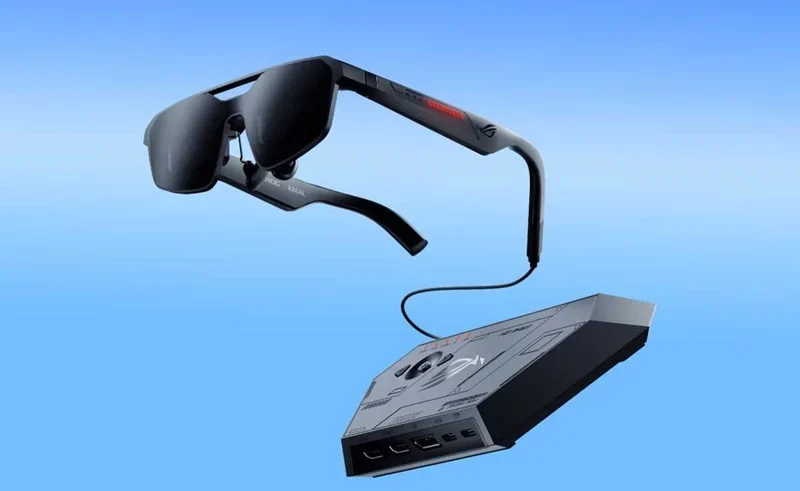
In today’s official store release of the Asus ROG Vision-Air, the physical and virtual realms have once again merged. Now, on May 15, 2026, tech lovers can finally get their paws on what is called the biggest step towards wearable displays this decade. This wearable tech isn’t any ordinary screen, but a high-performance spatial computer engineered exclusively for the ROG family. It doesn’t matter if you’re playing e-sports or just a fan of the genre, knowing the virtual reality home setups is the initial step towards turning your everyday surroundings into a battle station.
The Hardware: Why the Vision-Air is Game-Changing
The ROG glasses are much lighter than the previous models with heavy weight, which actually weighs only 75 grams and looks like a high-quality pair of sunglasses. Though they’re still compact, they feature two Micro-OLED screens that can create a 201-inch virtual display right in front of one’s eyes.
The glasses come with 144Hz refresh rates and 100% DCI-P3 colour gamut, according to the Official Asus ROG Global website. This degree of immersive wearable tech also means there is no motion blur: a particularly important factor for fast-action shooters. It is powered through USB-C to the ROG Ally, laptops, or even the latest smartphones, offering lag-free performance that is on-par with high-end desktop monitors.
Optimizing Your Virtual Reality Home Setups
When it comes to making the best use of your new gear, you must take into account the physical environment you are in. Although it is possible to “Augment” the view with the glasses, there is a need for a dedicated space to achieve optimal performance.
Calibration and Spatial Mapping
The glasses map in real time what is in your room. To enjoy the best at-home VR experience, you must have a space of at least 2×2 meters free of obstacles. The Asus “Armoury Crate” software lets you attach virtual windows to certain spots in your room. For example, you can get your gameplay displayed on the ceiling and your chat on Discord on your left wall.
Audio Integration
The glasses also come with integrated speakers, but with an immersive wearable tech experience, it’s recommended to pair them with ROG Cetra True Wireless earbuds. This configuration features active noise cancellation, which means that the only sound you will hear is the environment in the game.
Tech Drops You Shouldn’t Miss!
One UI 8.5 Adds Big Features?
Check out Samsung’s latest Android 16 upgrades and the new AirDrop-style sharing support.
How Powerful Is COSMO AI?
Dive into how Google plans to bring smarter on-device AI to everyday users.
Should You Delete Girigo App?
Uncover why cyber experts are raising urgent safety concerns over this viral app.
Want Anime Apocalypse Soul Shards?
Find the easiest way to grab rewards before the event deadline closes.
How To Unlock Battle Emote?
Get to know how gamers can claim the exclusive Jollibee Mobile Legends reward.
Compatibility and Future-Proofing
The Vision-Air is compatible with leading games, supported by Asus’ collaboration with key game developers. The Xbox official website has already confirmed support for Cloud Gaming on the glasses, letting gamers enjoy the latest AAA games anywhere, provided they have a stable 5G connection.
Additionally, Steam Deck drivers have been released by the Steam Deck community to guarantee compatibility, so it is a great option for any handheld player. At the Consumer Electronics Association, experts say these glasses are the first in a series of developments that will change the way people interact with computers, moving from the current screen-based interaction to a more spatial future.
FAQs
Can I wear these glasses over my prescription lenses?
The ROG Vision-Air includes a prescription lens frame in the box. You can take this frame to any local optician to have custom lenses fitted, which then magnetically snap into the gaming glasses.
Do these glasses require a separate battery?
No. The glasses are powered by the device they are plugged into. While this makes them lightweight, it does mean your handheld or laptop battery will drain slightly faster than usual when using the immersive wearable technology.
Is there a ‘pass-through’ mode for safety?
Yes. By tapping the right temple, you can switch between a fully immersive blackout mode and a transparent mode, allowing you to see your physical surroundings in your virtual reality home setups without taking the glasses off.